AI tools like ChatGPT, Gemini, and Perplexity actively visit websites to gather information — if they cannot read yours, you become invisible to their answers
You can check your website's AI readiness in under 30 seconds using free tools — no developer, no login required
The most common issue found on business websites is vague content that does not clearly explain what the business does or who it serves
Fast page loading, clear headings, and structured content benefit both human visitors and AI agents simultaneously
Fixing these issues does not require rebuilding your website — most improvements are content and copy changes, not technical ones
There is a new type of visitor coming to your website that you have probably never thought about: AI agents.
When someone asks ChatGPT "which is the best renovation company in Petaling Jaya?" or asks Perplexity "compare HR software for Malaysian SMEs," those AI tools do not just guess the answer. They visit real websites, read what businesses have written about themselves, and decide whether to mention them in the response.
If your website is difficult for an AI to read — too slow, too vague, or structured in a way machines cannot parse — it simply gets skipped. Your competitor with a cleaner, clearer website gets mentioned instead.
The good news: you can check whether this is happening to you in about 30 seconds, using free tools that require no technical skills.
Think of it this way: You would not hand a customer a brochure printed in tiny text, with no headings, and no clear description of what you sell. But that is effectively what many business websites look like to an AI agent. This guide shows you how to check — and what to do about it.
Why AI Agents Visit Your Website
AI tools like ChatGPT, Perplexity, Gemini, and Claude do not only rely on information they were trained on. For current, specific, or local queries, they send a bot to visit live websites and read them — the same way Google's crawlers do, but for the purpose of answering a direct question rather than ranking a search result.
This creates a new kind of competition. It is no longer just about ranking on the first page of Google. It is about whether an AI tool considers your website credible enough, clear enough, and structured well enough to reference when someone asks a relevant question. This is what AI SEO and GEO (Generative Engine Optimisation) are about — being found not just by Google, but by the AI tools your customers are already using.
Old visibility
Customer searches Google → sees your link → clicks through to your website
New visibility
Customer asks ChatGPT → AI visits websites → recommends your business directly in the answer
The difference is significant: in the old model, you needed to rank. In the new model, you need to be understood. Those are different problems with different solutions.
Free Tools to Check Your Website Right Now
Each of these takes under a minute. Paste your URL, click scan, and read the report. That is it.
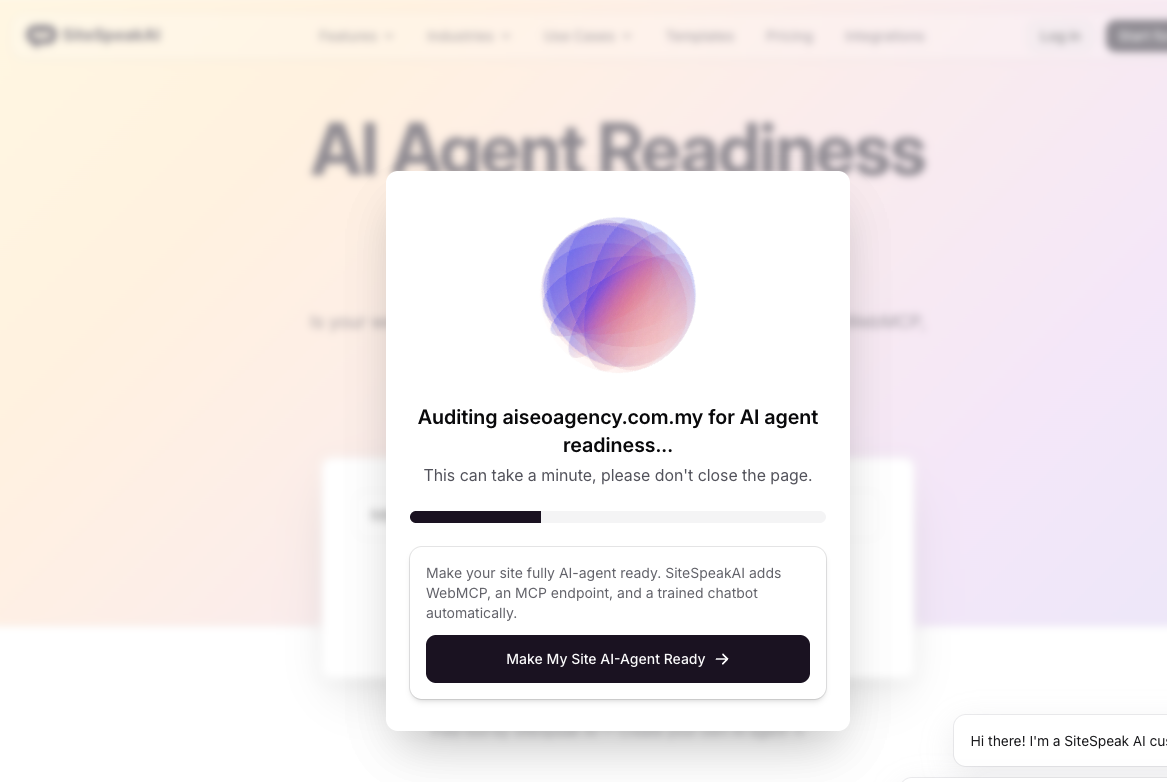
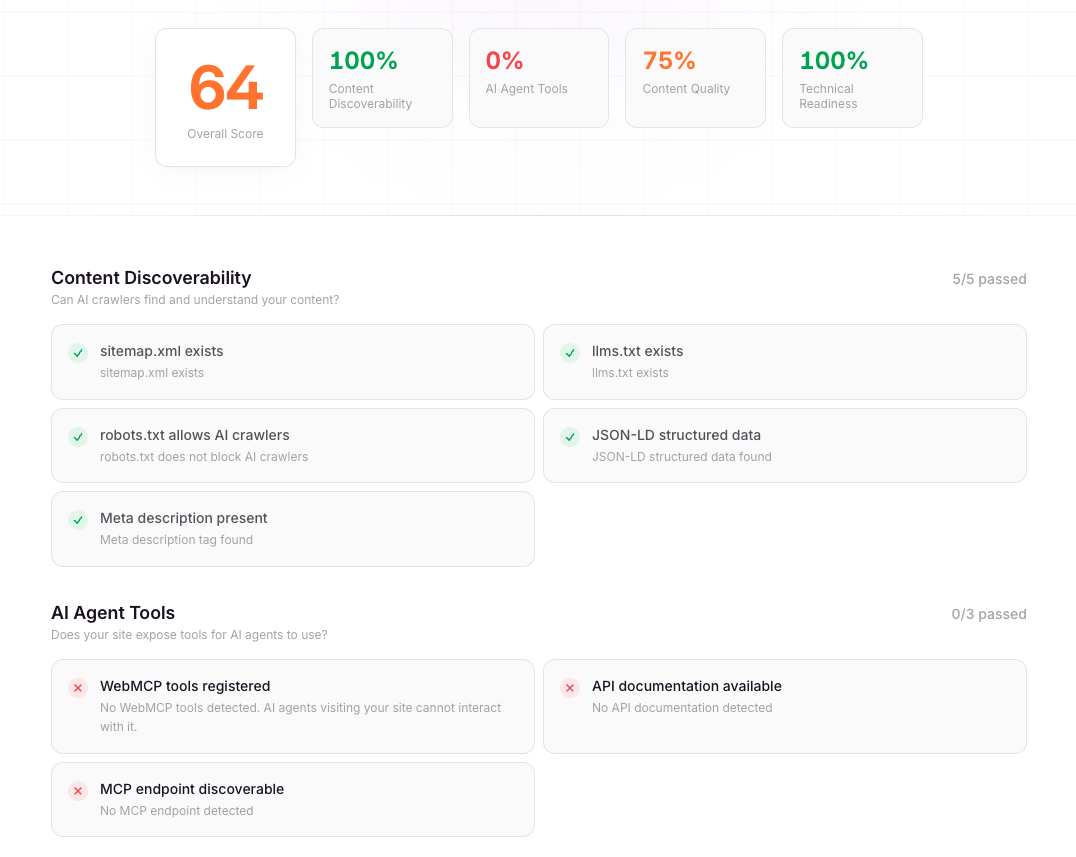
Paste your URL and get a report in about 30 seconds covering whether AI agents can read your content, whether your structured data is set up correctly, and whether you have the basic files AI tools look for. Gives a clear breakdown of what passes and what needs attention. No signup required.
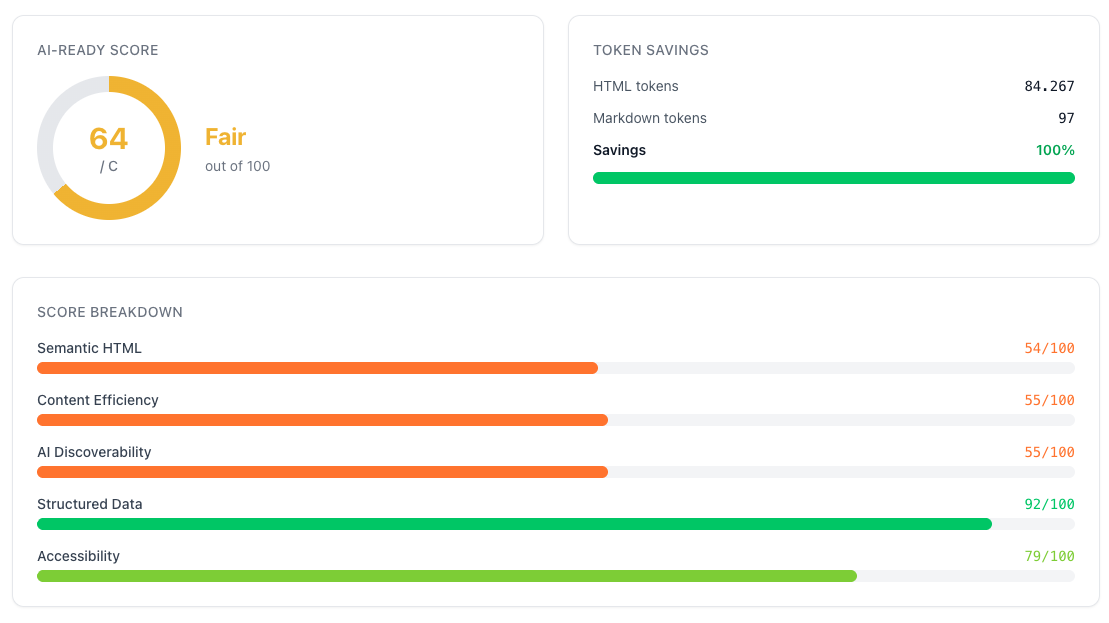
Checks 20+ signals in 10 seconds including whether AI bots are allowed to access your site, whether your content is clean enough for AI to extract, and whether you have the key files in place. Shows a score and gives copy-paste fixes you can hand to your web developer or implement yourself.
Built by Cloudflare, one of the largest web infrastructure companies in the world. Checks whether AI agents can discover your site, access your content, and understand what you offer. Particularly good for identifying whether any settings on your website are accidentally blocking AI tools from visiting.
Google's own free tool. Paste your URL and it shows how fast your website loads, how stable it is, and how well it performs for real visitors. Slow or unstable pages are harder for AI agents to process — and they affect your Google rankings too. Look at the mobile results, not just desktop.
Best for: page speed and loading performance
How to Read Your Results (Without a Developer)
When you run these scans, you will see a list of checks with pass or fail labels. Here is what the most common ones actually mean in plain language.
🤖
AI Bots Can Access Your Site
Your website settings are not accidentally blocking AI tools like ChatGPT or Perplexity from visiting. This should pass for most websites.
📄
Content Readability
Whether AI can extract clean, meaningful text from your pages. Failing this usually means your site relies too heavily on images, videos, or complex layouts to convey information.
🏷️
Structured Data (Schema)
Extra labels in your website code that tell AI exactly what type of business you are, what services you offer, and who your customers are. Many websites do not have this at all.
⚡
Page Speed
How fast your pages load. Slow pages are harder for AI agents to process — and they make real visitors leave before the page even finishes loading.
📋
llms.txt File
A simple text file at your website's root that gives AI tools a quick summary of what your site contains. Think of it as a table of contents for AI agents. Most business sites do not have one yet.
🗂️
Sitemap
A file that lists all your important pages so AI crawlers can find them. Most modern websites generate this automatically — check that yours exists and is up to date.
The Most Common Issues Malaysian Business Websites Have
After running these checks across dozens of local business websites, the problems that come up most often are not technical at all. They are content problems.
1 Most Common Issue
Vague Homepage Copy
The single most common problem: the homepage says things like "We are a professional services company dedicated to excellence" but does not say what services, who the customers are, or what city you operate in.
AI Cannot Work With This
"We are a leading digital solutions provider committed to delivering innovative services to our valued clients."
AI Can Cite This
"Marvant Evolutions is a Petaling Jaya AI SEO agency helping Malaysian SMEs appear in Google AI Overviews, ChatGPT, and Perplexity results."
An AI cannot recommend your business if it cannot tell what your business does. Specific, plain-English descriptions of your services — including your location — are the most impactful single change most business websites can make.
2 Common Issue
No FAQ Section
AI tools are built to answer questions. If your website does not answer questions, you are missing the format that AI is most likely to cite. A simple FAQ section covering "What do you offer?", "Who is it for?", "How does it work?", and "How much does it cost?" can significantly improve how AI represents your business.
3 Common Issue
No Service Pages — Just a Homepage
AI agents look for specific, detailed pages. A single page that tries to describe everything gives AI nothing specific to reference. A clinic with separate pages for "general consultation," "aesthetic treatments," and "health screenings" will be cited far more accurately than a clinic with one page that says "we offer a wide range of services."
4 Common Issue
Slow Mobile Loading
If your website takes more than 3 seconds to load on a phone, AI agents and Google both penalise it. Most visitors in Malaysia are on mobile — run the PageSpeed Insights check specifically on mobile to see where you stand.
📌Real example: A renovation company in Kota Damansara had a homepage that said "We provide quality renovation services at affordable prices." After rewriting it to describe their specific services (kitchen cabinets, bathroom renovations, condo interior design), the location areas they serve, and adding a FAQ section — they started appearing in Perplexity answers for local renovation queries within weeks.
What to Fix — In Order of Ease and Impact
You do not need to do everything at once. Here is the right order based on effort versus impact.
Fix
Effort
Impact
Who Does It
Rewrite your homepage to describe your services specifically
Low
Very High
You / copywriter
Add a FAQ section to your key pages
Low
High
You / copywriter
Create individual service pages instead of one combined page
Medium
High
You / web designer
Add llms.txt file to your domain
Low
Medium
Developer (10 min)
Add schema markup (structured data) to service pages
Medium
High
Developer / SEO plugin
Fix page speed issues flagged by PageSpeed Insights
Medium–High
High
Developer
The first two rows — rewriting your homepage and adding a FAQ section — require no developer and no budget. If you do nothing else after reading this article, do those two things. They will make the biggest difference to both AI visibility and human conversions.
Run Your First Check Right Now — Step by Step
1
Go to sitespeak.ai/tools/ai-agent-readiness-scanner
Open the link in your browser — no account needed
2
Type your website address in the box
For example: yourcompany.com.my — just the web address, nothing else
3
Click "Scan" and wait about 30 seconds
The tool will check your site and return a report
4
Screenshot the results
Note which checks pass and which fail — these are your starting point
5
Repeat for pagespeed.web.dev on mobile
Switch to "Mobile" in PageSpeed Insights — this is the result that matters most for Malaysian audiences
6
Share the reports with your web team or agency
You do not need to interpret every detail — the reports are designed to be shared. Ask your developer to address any red flags
Quick-Win Checklist You Can Action This Week
✓ Run one of the free scanner tools above and screenshot your results
✓ Check your homepage — does the first paragraph say exactly what you do, who for, and where? Rewrite it if not
✓ Count your service pages — do you have a separate page for each main service? If not, plan to create them
✓ Add a FAQ section to your most important service pages answering the 5 questions your customers ask most often
✓ Run PageSpeed Insights on mobile — if your score is below 50, flag it as urgent for your developer
✓ Check whether your website has a sitemap — ask your developer or check yoursite.com/sitemap.xml
Now You Have Your Results — Here's Exactly What to Do Next
Each section below maps to a specific failure you might see in your scan. Find the one that matches what failed and follow the steps exactly.
1 If "Content Accessibility" or "Content Readability" Failed
What You See on Screen
SiteSpeak shows a red or amber result for "Content Accessibility." AgentReady.md flags your content as hard to extract. This means AI agents are visiting your site but cannot pull out clear, usable information about what you do.
Why It Fails
The most common reason: your key pages lead with vague marketing language instead of a direct description. AI agents read your first paragraph and decide within seconds whether the page is worth citing. If it does not immediately say what your business does, they move on.
What fails the check
"We are a professional team committed to delivering quality services with a customer-first approach."
What passes the check
"Klinik Utama Damansara is a family clinic in Damansara Uptown, PJ, offering GP consultations, health screenings, and chronic disease management. Open Mon–Sat, 8am–8pm."
What to Do — Step by Step
1
Open your homepage and your top 2–3 service pages
Read the first paragraph on each page out loud. Ask yourself: if someone who had never heard of my business read only this paragraph, would they know exactly what I sell, who I sell it to, and where I operate?
2
Write a new first paragraph using this formula
[Business name] is a [type of business] in [specific location], offering [list your 3 main services]. We serve [your typical customer]. [One sentence on how to get started]
3
Log in to your CMS and replace the existing first paragraph
In WordPress: click Edit Page → find the first text block → replace the text → click Update. In Elementor: click Edit with Elementor → click the text widget → edit → green tick → Publish. No developer needed.
4
Re-run the scan after 24 hours
Go back to SiteSpeak or AgentReady.md and paste your URL again. The content accessibility score should improve once crawlers re-index your updated page.
For more on structuring content so AI tools can extract and cite it, read our guide on optimising content for Google AI Overviews — the same principles apply to ChatGPT and Perplexity.
2 If "Structured Data" or "Schema Markup" Failed
What You See on Screen
SiteSpeak shows a fail or warning for "Structured Data Analysis." AgentReady.md flags Schema.org as missing or incomplete. This means AI agents cannot tell what type of business you are — they are guessing from plain text instead of reading clear machine-readable labels.
What to Do — If You Use WordPress with Rank Math
1
Go to Rank Math → Titles & Metas → Local SEO
Fill in your business name, type, address, phone number, and opening hours. Click Save Changes. Rank Math automatically adds LocalBusiness schema to every page on your site.
2
On each service page, set the Schema type in the Rank Math sidebar
Open the page in WordPress editor → click the Rank Math icon (top right) → Schema → choose the type from the table below → fill in the required fields → Save.
3
Verify it using Google's Rich Results Test
Go to search.google.com/test/rich-results, paste your page URL, click Test URL. If it shows detected schema types with no errors, it is working. If there are errors, screenshot them and send to your developer.
Your Business Type
Choose This Schema in Rank Math
Café, restaurant, F&B
Restaurant
Clinic, pharmacy, health
MedicalClinic or LocalBusiness
Renovation, contractor
LocalBusiness → HomeAndConstructionBusiness
Salon, beauty, aesthetic
HealthAndBeautyBusiness
Tuition, education
EducationalOrganization
Law firm, accounting
LegalService or AccountingService
Property agent
RealEstateAgent
Any blog or FAQ page
Article + FAQPage
Not on Rank Math? Yoast SEO has the same settings under Yoast → Search Appearance → Local. If you have neither plugin, share this table with your developer and ask them to add the schema type in JSON-LD format. Full technical details in our guide on optimising your website for AI search.
3 If "Bot Access" or "AI Crawler Access" Failed
What You See on Screen
Cloudflare's tool shows certain AI agents cannot access your site. AgentReady.md flags your robots.txt as blocking AI bots. This is the most urgent fix — no amount of good content helps if AI tools are blocked from reading it.
What to Do — Step by Step
1
Check your robots.txt file right now
In your browser address bar type: yourwebsite.com.my/robots.txt and press Enter. Look for any of these bot names listed under Disallow: / — GPTBot, Google-Extended, PerplexityBot, ClaudeBot, anthropic-ai, OAI-SearchBot.
2
Screenshot what you see and send it to your developer
Ask them to change any Disallow: / line next to an AI bot name to Allow: /. This is a 5-minute change to a single text file. If the robots.txt was auto-generated by Yoast or Rank Math, ask the developer to update it from inside those plugin settings.
3
If your site uses Cloudflare, check the firewall too
Log into your Cloudflare dashboard → Security → WAF → Custom Rules. Look for any rules that broadly block "bots." Ask your developer to whitelist GPTBot and PerplexityBot specifically so they pass through the firewall.
4
Re-run the Cloudflare scan after the change
Go back to isitagentready.com and scan again. Bot access should now pass.
Blocking AI — fix thisUser-agent: GPTBot Disallow: /
Allowing AI — correctUser-agent: GPTBot Allow: /
4 If PageSpeed Insights Score Is Below 50 on Mobile
What You See on Screen
PageSpeed Insights gives you a score from 0–100. Below 50 shown in red means your website loads too slowly on mobile. The Diagnostics section below the score tells you exactly what is causing the problem — start there, not with guessing.
What to Do — Step by Step
1
Read the "Opportunities" section — note the top 3 items
In PageSpeed Insights, scroll past the score to "Opportunities." The items are sorted by impact — the ones at the top are causing the most slowness. Screenshot the top 3 and send to your developer with the message: "Please fix these three issues."
2
If you see "Properly size images" — fix it yourself
Go to squoosh.app. Upload your hero image. Choose WebP format. Reduce quality to 80%. Download and re-upload to your website replacing the original. Repeat for any image over 200KB. No developer needed for this step.
3
If you see "Reduce unused JavaScript" — deactivate plugins
Log into WordPress → Plugins → Installed Plugins. Deactivate any plugin you have not actively used in the past 3 months. Common culprits: old slider plugins, social sharing buttons, pop-up builders, and duplicate analytics scripts. Each plugin removed typically improves your score by 3–5 points.
4
If you see "Serve static assets with an efficient cache policy" — install WP Super Cache
In WordPress → Plugins → Add New, search "WP Super Cache," install, activate. Go to Settings → WP Super Cache → turn Caching On → Update Status. This alone can improve your score by 10–20 points.
5
Re-run PageSpeed Insights after each change
Test after each individual fix so you can see exactly how much each change helped. Aim for above 50 on mobile first, then 70. You can find ongoing monitoring tools in our AI SEO tools guide.
5 If llms.txt Is Missing or Invalid
What You See on Screen
All three scanners check for llms.txt. You will see "Not found," "Missing," or "Invalid" next to this check. This is the fastest fix — a 10-minute task once you know what to do.
What to Do — Step by Step
1
Generate your llms.txt automatically for free
Go to sitespeak.ai/tools/llms-txt-generator. Enter your website URL and click Generate. The tool builds an llms.txt file from your existing sitemap. Download the file.
2
Open the file and fix any vague descriptions
Open the downloaded file in Notepad (Windows) or TextEdit (Mac). Check that the first line starts with # followed by your business name, and that each page listed has a specific description — not just the page title. Replace anything generic with a one-line description of what that page actually covers.
3
Send the file to your developer to upload
Ask them to place the file at yourwebsite.com.my/llms.txt — at the root of your domain, not inside any folder. They can verify it is live by visiting that URL and seeing the plain text content appear.
4
Re-run your scan to confirm it passes
Go back to SiteSpeak or AgentReady.md and scan again. The llms.txt check should now show as passing. If it still shows "Invalid," check that the file URL loads in a browser and that the first line starts with #.
6 If Your Pages Have No FAQ Section
Why This Matters
This will not appear as a named scan failure, but if your content score is low and your pages have no FAQ sections, adding them is the fastest content fix you can make. AI agents are built to answer questions — FAQ content is the format they cite most frequently because it already matches the question-answer structure of how people search.
What to Do — Step by Step
1
Write 5 questions your customers ask most often — per service page
Think about the WhatsApp messages and phone calls you get before someone books or buys. Pricing, location, process, timeline, and "is this right for me" are the five most common categories for Malaysian business websites.
2
Write direct answers — the way you would reply in WhatsApp
No marketing language. Include specific prices where possible, exact location names, realistic timeframes, and any conditions that apply. One clear paragraph per answer is enough.
3
Add the FAQ to your page using an Accordion widget in Elementor
In Elementor, search "Accordion" in the widget panel → drag it onto your page → add each Q&A. In WordPress Gutenberg, use the native FAQ block. Make sure the questions render as visible text — not hidden inside images.
4
Add FAQPage schema via Rank Math to make it machine-readable
Open the page in WordPress editor → Rank Math icon → Schema → Add New Schema → FAQPage → add each question and answer inside the schema fields → Save. This tells AI tools these are verified Q&A entries, not just regular body text.
FAQ sections are one of the strongest formats for getting cited by ChatGPT and other AI tools — they naturally match how people ask questions to AI assistants.
Final Thoughts
Being ready for AI agents is not a separate project from having a good website. Almost everything that helps AI tools read, understand, and recommend your business also helps real customers understand what you offer and why they should contact you.
The business owners who will benefit most from AI search are not necessarily the ones with the biggest marketing budgets. They are the ones with the clearest, most specific, and most honest descriptions of what they actually do — structured in a way that any reader, human or machine, can understand immediately.
Start with a free scan today. Fix the copy first. Then work through the technical improvements with your web team at whatever pace makes sense for your business. Once you have made changes, use our guide on measuring AI SEO performance to track whether your visibility in AI tools is actually improving.
It means AI tools like ChatGPT, Gemini, and Perplexity can read your website clearly, understand what your business offers, and use that information when answering user questions. If your site is not AI-ready, these tools may skip your content entirely or misrepresent your business.
No. There are several free tools that scan your website and give you a plain-English report in under 30 seconds. You just paste your URL and read the results. No technical skills or logins required.
The single most impactful fix for most business websites is making sure your content is clearly written, well-structured with proper headings, and describes your services specifically. AI agents cannot guess what you do from a vague homepage.
Yes. Almost everything that helps AI agents read your site also helps Google. Fast pages, clear headings, structured content, and schema markup all improve both traditional SEO and AI visibility simultaneously.
A quarterly check is a reasonable starting point. Run one of the free tools whenever you make significant changes to your website — new service pages, a redesign, or a content update — to make sure you have not accidentally broken anything.
Jiayi Gan is the CMO at Marvant Evolutions, with experience spanning startups & leading 4A MNC advertising agencies. She has managed multi-million-ringgit advertising investments across Google, Meta, and TikTok for businesses across multiple industries. Today, she leads AI-powered marketing initiatives across SEO, AIGC, marketing automation, and performance media, enabling brands to improve search visibility, scale content production, and accelerate business growth.