- Businesses can create a free Business Hub on ChatGPT (launched in November 2026). You can claim your business and manage how you want your brand to appear in ChatGPT. However, you cannot guarantee your business will show up. The recommendation algorithm will still run, but your profile will be verified allowing you to manage the category, description and contact information.
- The Business Agent is a branded chat powered by your product feed. This is only available to e-commerce businesses in the US currently.
- The Insights dashboard allows for tracking mentions, clicks and discovery topics on your website within the last 28 days. Minimum requirements must be met.
- Online businesses in Malaysia may be able to claim a profile, however local businesses and Business Agents are only available to businesses in the US currently.
On the 10th November 2026, OpenAI announced Businesses within ChatGPT. This free Business Hub can be claimed by any qualifying company. This allows you to verify your ownership and manage your profile within ChatGPT. Think of this like Google Business Profile, however for the world's largest AI assistant.
This is key for Malaysian businesses looking to increase visibility in AI searches. With over 200 million people using ChatGPT weekly, more and more users are asking for suggestions. This guide will walk through what the Business Hub is, how to create it, what you can view and manage and what is available for Malaysian based businesses.
Source: chatgpt.com/business-hub
How to Create Your Business Profile on ChatGPT
You can set up your Business Profile on chatgpt.com/business-hub. This can take between a few minutes to a few days while your verification is assessed by OpenAI. Below is the full process.
Step 1: Find Your Business
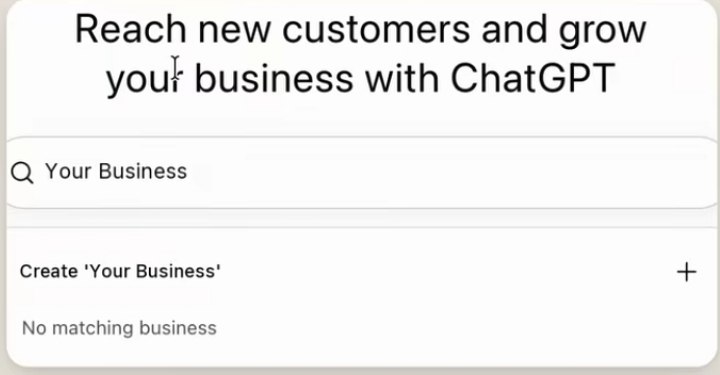
Go to chatgpt.com/business-hub and you will land on a screen that says "Reach new customers and grow your business with ChatGPT." Type your business name into the search bar. If ChatGPT finds your listing, it will appear below the search bar. Select it to proceed. If no match is found, you will see a Create 'Your Business' option with a + button. Click this to create a new listing from scratch. Make sure the ChatGPT account you are using belongs to your business before continuing.
Step 2: How Customers Reach You
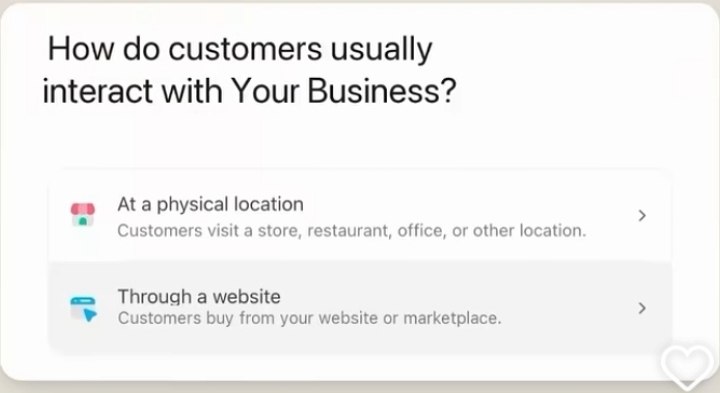
ChatGPT will ask: "How do customers usually interact with Your Business?" You will see two options. Choose At a physical location if customers visit a store, restaurant, office, or any physical premises. Choose Through a website if customers buy from your website or an online marketplace. This selection determines which verification and setup steps follow, so pick the one that best describes your primary business model. Most Malaysian online businesses will select Through a website.
Step 3: Verify Your Website
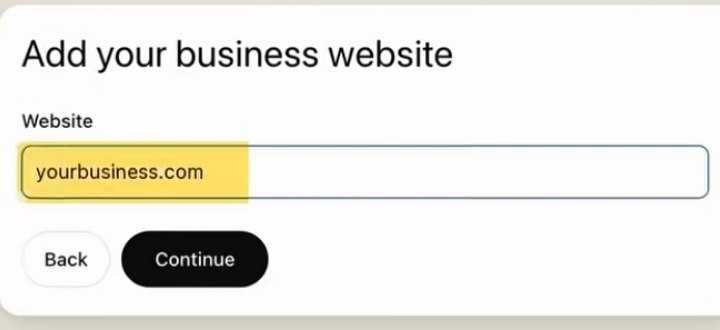
If you selected Through a website, the next screen will ask you to Add your business website. Enter your domain (e.g. yourbusiness.com) into the field and click Continue. This is the domain that ChatGPT will associate with your profile and use for verification.
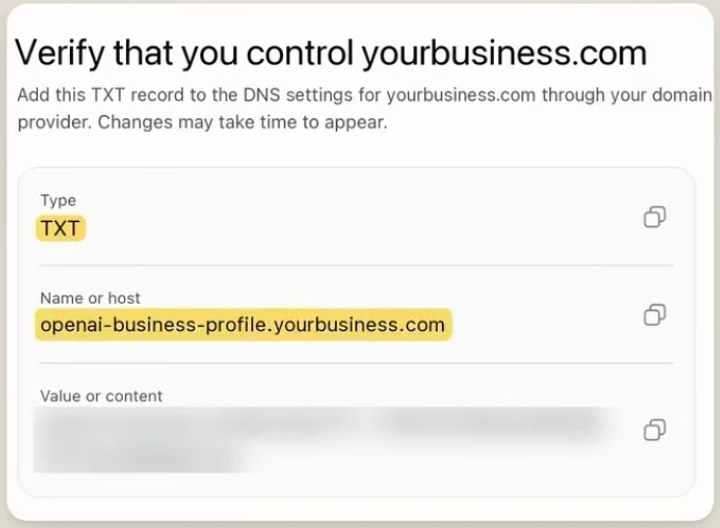
Once you submit your domain, ChatGPT will show a screen titled "Verify that you control yourbusiness.com." You will be given a DNS TXT record to add to your domain's DNS settings through your domain provider. The record has three fields: Type (set to TXT), Name or host (formatted as openai-business-profile.yourbusiness.com), and a Value or content unique to your account. Add these exactly into your DNS host settings and click Verify. Note that DNS changes can take a few minutes to propagate. Many DNS providers automatically append your root domain to the host field. Double-check this to avoid a mismatch that will cause verification to fail.
Step 4: Pick Your Business Category
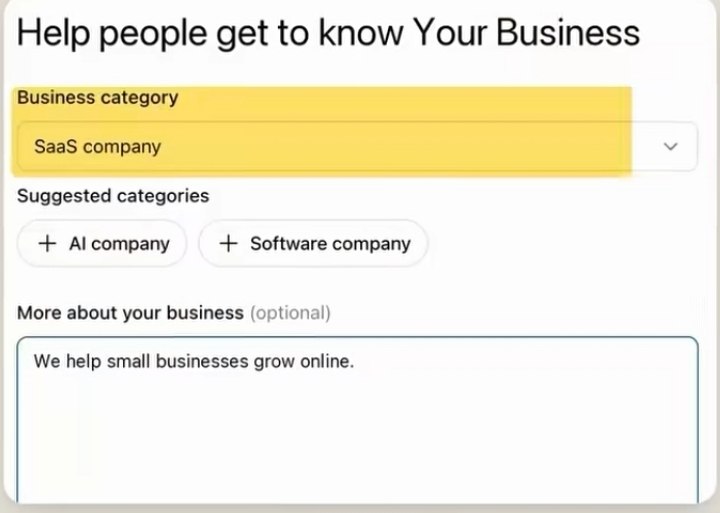
After your website is verified, ChatGPT will prompt you to "Help people get to know Your Business." You will see a Business category dropdown. Select the category that best describes what you do. ChatGPT may also suggest related categories below the dropdown (for example, if you select SaaS company, it may suggest AI company or Software company as alternatives). Below the category field is a More about your business text box (marked optional) where you can add a short description. Use this to clearly describe what your business does, who it serves, and where you operate. This description feeds directly into how ChatGPT understands and presents your business to users.
Step 5: Verify Yourself
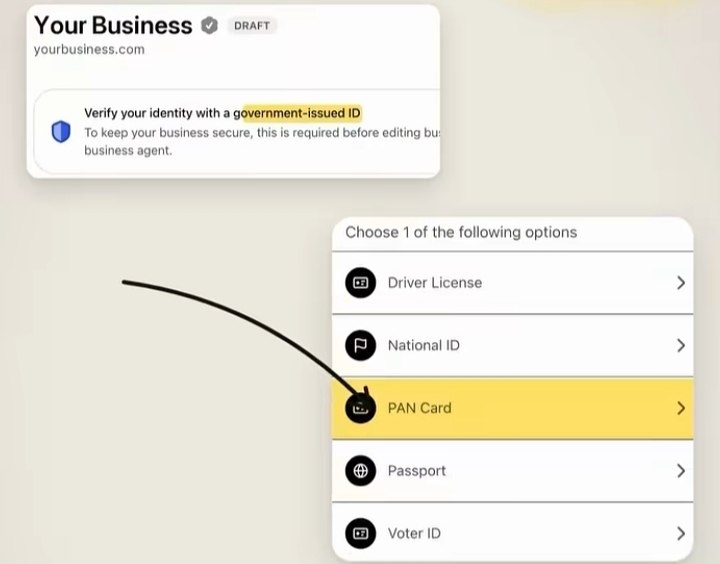
The final step is personal identity verification. Your profile will appear in DRAFT status until this is complete. ChatGPT will prompt you to "Verify your identity with a government-issued ID." This is required before you can edit your profile, publish a Business Agent, or access analytics. You will be presented with a list of accepted ID types: Driver Licence, National ID, PAN Card, Passport, or Voter ID. Select the one that applies to you and follow the upload instructions. For Malaysian businesses, your MyKad (National ID) or Passport are the relevant options. Once OpenAI approves your submission, your profile will move out of draft and your verified badge will appear.
When Your Market Opens: What To Do Next
Once OpenAI approves your verification, you will be taken to the Business Hub Overview where a series of Get Started cards will guide you through completing your profile. Work through each section in order. Every field you leave empty is a missed opportunity for AI to understand and recommend your business.
- ✓ Business Category
- ✓ Business Information
- ✓ Logo & Cover Image
- ✓ Policies
- ✓ Product Feed / Shopify Integration
- ✓ Business Agent
- ✓ Invite Team Members
Your completed profile will need to be reviewed by OpenAI before it goes live, so allow a few business days for this final step. You will receive an email confirmation once approved.
What Is the Impact of a Business Profile on ChatGPT?
Whilst having a Business Profile does give you some control and credibility, it will not mean that your business will be frequently mentioned within ChatGPT. OpenAI have stated that claiming a profile 'should not have an impact' on how your company will appear and you will not be guaranteed to rank higher or sell more. However you will have control.
The main thing to note here is that recommendations will still be based on your website content, mentions and entity signals. Having a verified profile will not replace this but sit on top of it. Those that invest into improving their AI visibility will gain more from having a Business Profile.
What Insights Does the Business Hub Provide?
Once your profile has been claimed and verified you will be able to view insights within the Overview tab. All metrics will be based on the last 7 or last 28 days. No insight will tell you what individuals searched for.
Mentions
For businesses, mentions are counted whenever your website has been mentioned within a response. Mentions of your brand name alone will not count. The response must have a link to your domain. If you are a business with a website, you will only qualify for mentions based on your website domain.
Website Clicks
The amount of times users have clicked through to your website from a ChatGPT response. OpenAI state that clicks "don't confirm website visits or conversions", meaning that this is purely showing intent to click. This will not match what you see in Google Analytics.
Discovery Topics
This will show you the common themes that have been mentioned when your website appears in a response. This is the most valuable metric on the dashboard. It tells you what people were asking for when your business was mentioned. Use this to identify what content on your site is being cited by the AI and what topics you are missing.
What the Insights Dashboard Cannot Tell You
| What You Want to Know | Available in Business Hub? | Workaround |
|---|---|---|
| What prompted the mention | ✕ Not available | Use Discovery Topics instead. |
| Competitors mentioned | ✕ Not available | Manually search ChatGPT by category. |
| Click Conversion Rate | ✕ Not available | Use UTM Parameters on your website URLs. |
| Trend of mentions | ✕ Not available | Manually record monthly data. |
| Pages Mentioned | ✕ Not available | Crawl logs or Server Side Referrer. |
What Can the Business Agent Do?
The Business Agent is a key feature of the Business Hub but comes with some limitations. This is a branded agent within ChatGPT that uses your product feed and policies to answer customer questions.
When a user is chatting to ChatGPT and asks a question about your product, pricing or policies, ChatGPT can pass this over to your Business Agent. This is clearly marked so users know they are speaking to an agent from the seller. The agent can answer questions about your products, explain your return policies and send customers to your website.
The Business Agent can also act as a destination for ChatGPT Ads. This means you can link your paid ads to a conversation around a branded product. These Ads are currently in limited testing and only available to selected advertisers.
Is ChatGPT Business Profile Available in Malaysia?
Malaysian businesses should take note of the following.
| Feature | Status | Notes for Malaysian Businesses |
|---|---|---|
| Claim an online business profile | ✦ Likely available | Online businesses can claim in markets where ChatGPT is available and supported by OpenAI. Malaysia is a supported market. |
| Claim a local store / restaurant listing | ✕ Not available | Local listings are only available in the US at launch. No timeline given. |
| Business Agent | ✕ Not available | Only available to eligible e-commerce & online service businesses in the US. |
| Insights Dashboard (Mentions & Clicks) | ✓ Available | Accessible once your profile is claimed and verified. |
| ChatGPT Ads | ✓ Available | ChatGPT Ads launched in Malaysia in September 2026. |
If you have an online business in Malaysia and have a website, you should now be able to claim your Business Hub. However, local businesses (retail, F&B, Clinics, Service Centres) will need to wait for OpenAI to expand claiming. Malaysian businesses will also not be able to use their Business Agent until OpenAI expands.
The most important thing to note is that how often your business is mentioned in ChatGPT will depend on how visible your business is within the AI. This comes down to the content of your website, external mentions and clear entity signals. Optimising your content for AI search will still be essential. The Business Profile adds an extra layer.
FAQ
Want to Know How Often your business is mentioned in ChatGPT?
AI SEO Agency can help Malaysian businesses create an AI Search presence so they can be cited in ChatGPT, Gemini & Perplexity.
Get a Free AI SEO Audit