
- Google Search Console now reports AI search performance data. Impressions from AI Overviews, AI Mode, and Discover's generative AI features have been visible for all properties worldwide since August 2026.
- A multimodal search filter launched on 24 September 2026 showing exactly how much traffic comes from Google Lens, Circle to Search, image uploads, and Chrome's right click image search.
- Click data is not yet part of the AI search report. Only impressions are available right now, but Google and the UK's CMA have both committed to adding click data in a future update.
- You can opt out of AI search features at the property level inside Search Console Settings, but doing so removes your site from AI Overviews, AI Mode, and Discover's generative AI surfaces entirely.
- Brands that start reading and acting on these reports now will have months of optimisation data before competitors even know the reports exist.
Search Console now includes AI search performance metrics. The number of impressions your pages generate inside AI Overviews, AI Mode, and Discover's generative AI features has been reportable since August 2026, covering every website globally. Then, on 24 September 2026, Google went a step further and added a multimodal search filter that tracks traffic driven by image-led search behaviours, including Google Lens, Circle to Search, image uploads, and the right click image search function built into Chrome.
For most brands, this is the first time AI search visibility has been measurable at all. Previously there was no way to confirm whether your content appeared in an AI Overview, let alone track it over time. That has now changed. The data is inside your existing Search Console account, and it is available today.
Brands that start reading these reports now and adjusting their AI search optimisation strategy will hold a measurable advantage. The window where this data is new and most competitors have not yet noticed it will not stay open long.
What Google Added to Search Console
Google's generative AI performance reports were first rolled out on 31 August 2026 and made available to all properties globally by late September 2026 according to Search Engine Journal. The reports sit inside the existing Performance tab in Search Console and add a new search type filter labelled Generative AI alongside the familiar Web, Image, Video, and News filters.
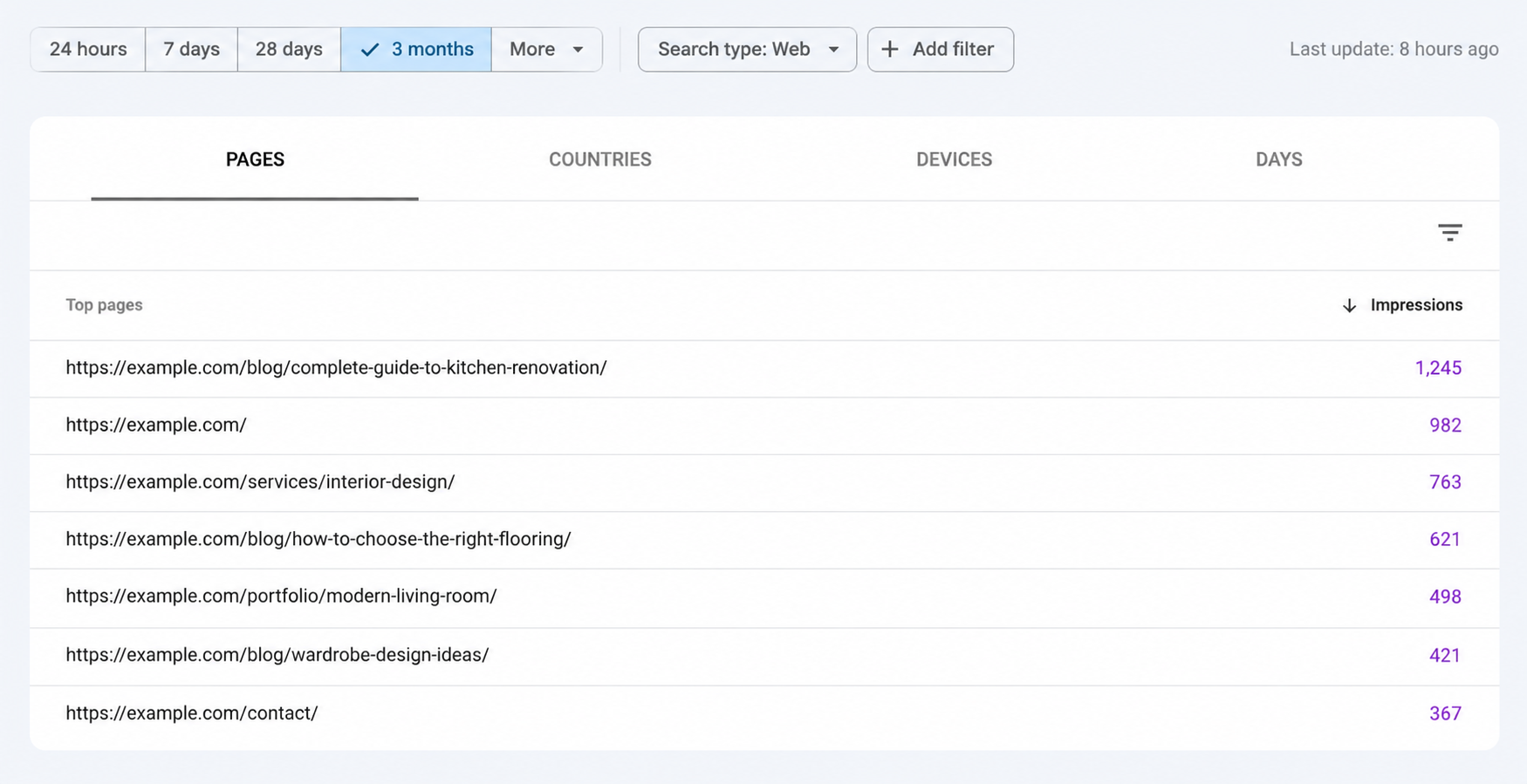
The report breaks your AI search impressions down by page, country, date, and device, using the same dimensions you are used to in the standard Search Performance report. What it does not yet include is click data. As of the August 2026 launch, impressions are the only metric available. Both Google and the UK's Competition and Markets Authority have stated that click data will be added in a future update.
The Multimodal Search Filter Added in September 2026
On 24 September 2026, Google added a second major update to Search Console: a multimodal search filter. This surfaces impression and click data for searches where a visual input was part of the query, covering four distinct search behaviours that were previously invisible to publishers.
| Search Type | How a User Triggers It | Most Relevant For |
|---|---|---|
| Google Lens | User points their camera at an object or scans an image to search for it | E-commerce, product pages, retail and home decor brands |
| Circle to Search | Android feature: user circles any image on their screen to trigger a Google search | App content, social media linked product pages |
| Image Upload | User uploads a photo directly into the Google Search bar | Visually rich content: interiors, fashion, food, property listings |
| Search This Image (Chrome) | User right clicks any image in Chrome and selects Google Search | Blog imagery, press coverage, product photography |
How to Access and Read Your AI Search Data
Both the generative AI report and the multimodal filter sit inside the Performance section of Google Search Console. Here is the exact sequence to follow when you open it for the first time.
- ✓ Open Search Console, go to Performance, then select Search results
- ✓ Click the Search type dropdown and select Generative AI to load the AI impressions report
- ✓ For multimodal data, select Web as the search type first, then look for the multimodal filter option below it
- ✓ Set your date range to the last 3 months to get enough data volume to identify trends
- ✓ Sort by Impressions in descending order to see which pages have the strongest AI search presence
- ✓ Compare Generative AI impressions against standard Web impressions for the same pages to measure your AI visibility ratio
Understanding Total Impressions
Inside the generative AI report, total impressions are currently the main performance metric available. An impression is recorded when your content appears within an AI-generated search result, so the number tells you how often Google is surfacing your pages across these AI search experiences. The most useful way to read this data is not by focusing on one total, but by watching how the impression trend changes over time.
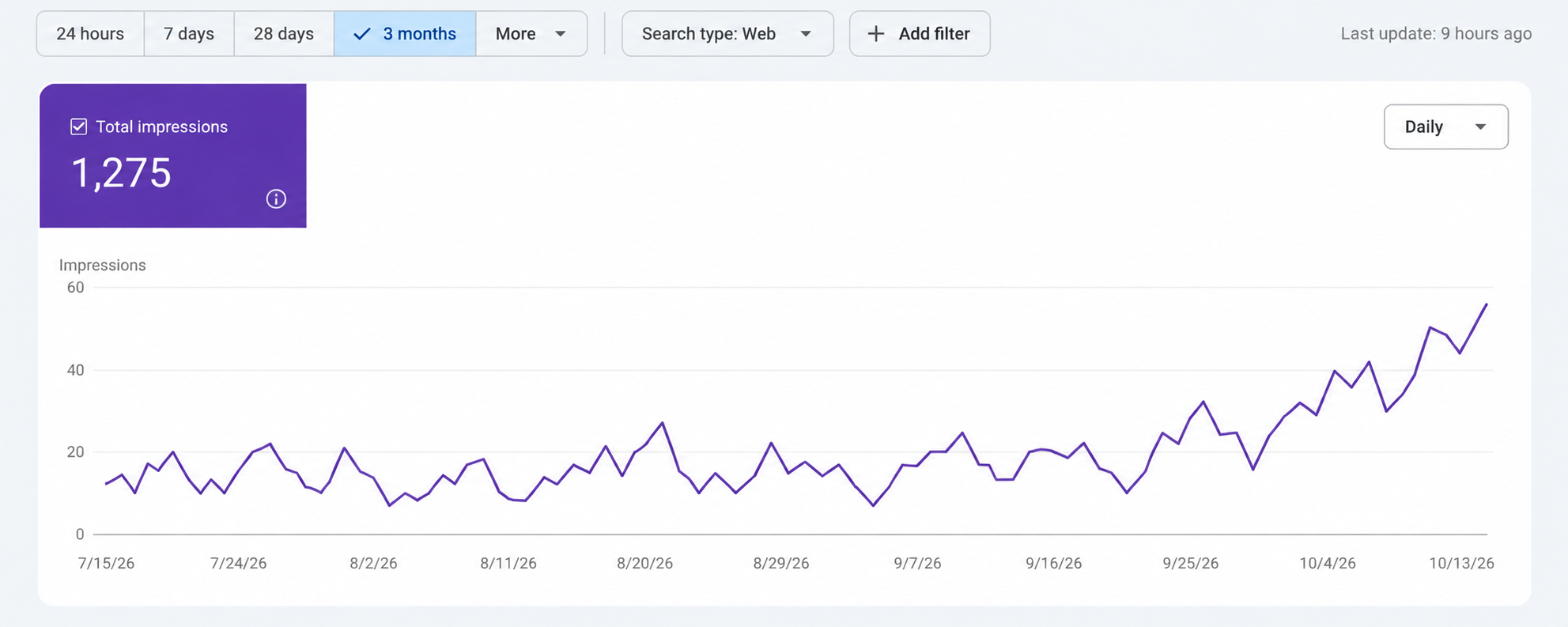
A consistent upward impression trend is the signal to watch. If impressions increase over several weeks, identify which pages are contributing most to that growth and review what those pages have in common. If impressions remain flat or fall, look at content structure, topical coverage and the clarity of the answers your pages provide. Click data is not yet included in the Generative AI report, so impressions should currently be treated as a visibility signal rather than a complete traffic metric.
What Every Signal Means and What You Should Do About It
Impression data only becomes actionable after it has been translated into a decision about content. Here is what each signal means and what to do about it.
If Your AI Impressions Are Increasing Month to Month
Determine which are the high performing pages and analyse them for patterns they share in terms of structure. How are they structured? Do they include a direct answer to the query within the first 100 words? Are they using clear H2 titles that correspond to the way people ask questions? Are they filled with specific, factual content as opposed to general discussion?
If You Have Poor or Zero AI Impressions
Your content structure is probably lacking the pieces needed for the AI system to extract an answer and attribute the source of that answer. The most critical element of structure is the Answer Capsule: an explicit answer to the query contained in the first 100 words of the section. Check your full AI SEO performance indicators alongside your GSC data to identify the specific gaps.
If You Have Meaningful Multimodal Impressions
This indicates that the images from your website are being discovered by users through image based searches. Review the alt tags, file names, and surrounding body text for every image on your site that has traffic. The best kind of alt tag describes the image as a user would see it, rather than using only target keywords. For interior images and product images, image optimisation is tied directly to multimodal impressions.
What Is Coming Next for These Reports
The current generative AI reports are a starting point. The UK CMA has given Google a set of publisher transparency requirements to meet, and the timeline attached to those requirements gives us a clear view of what is coming to Search Console over the next 12 months.
| Feature | Current Status | When to Expect It |
|---|---|---|
| AI search impressions (Generative AI filter) | Live globally since August 2026 | Available now in all accounts |
| Multimodal search filter (Lens, Circle to Search, uploads) | Live globally since September 2026 | Available now in all accounts |
| Click data for AI search results | Not yet available | Required by CMA; expected in 2027 |
| Page level opt-out control | Not yet available (property level only) | Required by CMA by March 2027 |
| Multimodal data inside the generative AI report | Partial rollout | Confirmed by Google; timeline not stated |
When click data arrives, AI search becomes a fully measurable performance channel rather than an impressions indicator. Brands that build their AI search presence now will have months of optimised content and established citation signals when that measurement capability lands. Brands that wait will be starting from zero with competitors already ahead.
Frequently Asked Questions
Ready to Get Cited by AI?
Let AI SEO Agency build your content strategy for ChatGPT, Gemini, and AI Overviews so your brand appears in the answers your customers are already reading.
Get a Free AI SEO Audit